Lead Magnet Delivery Email Flow for More Leads: The Step-by-Step Troubleshooting Checklist
Your lead magnet delivery email flow is leaking subscribers right now — and you probably have no idea where the break is. Someone fills out your form, hits submit, waits for their free checklist or PDF, and gets nothing. They assume you are unreliable. They leave. They never come back. That is not a small problem. That is your entire list-building strategy quietly bleeding out.
Most beginners spend hours designing the lead magnet and about twelve minutes setting up the delivery. That gap is where the damage happens. A broken trigger, a misconfigured tag, a spam filter eating your emails — any one of these kills the first impression before you even get to make it.
This article walks you through the exact checklist I would use to diagnose and fix a broken lead magnet delivery email flow, step by step, from the moment someone hits submit to the moment the resource lands in their inbox. By the end, you will know exactly where to look, what to fix, and how to build a sequence that actually works.
Table of Contents
- What a Lead Magnet Delivery Email Flow Actually Does
- Why Most Beginners Break This Before It Even Starts
- The Step-by-Step Troubleshooting Framework I Would Use
- Common Mistakes That Waste Subscribers and Kill Trust
- Advanced Tactics Most Articles Skip Entirely
- What I Would Avoid in Any Delivery Sequence
- Recommended Tools for Email Marketing Automation
- Step-by-Step Action Plan to Fix Your Flow Today
- FAQ: Lead Magnet Delivery Email Flow Questions
- My Top Recommended Gear
- Your Next Step
What a Lead Magnet Delivery Email Flow Actually Does
A lead magnet delivery email flow is an automated email sequence triggered by a form submission. It delivers the promised resource to the subscriber’s inbox, confirms their opt-in, and begins warming them up for future offers — all without manual intervention from you.
The flow is not just one email. It is a connected chain: form submission fires a trigger, trigger adds a tag or subscribes to a list, that tag or list enrollment launches an automation, the automation sends the delivery email, and follow-up emails continue the relationship from there.
Break any single link in that chain and the whole thing fails silently. No error message. No alert. Just a subscriber who never hears from you again.
Understanding the full chain — not just the “send email with download link” part — is what separates a working system from a broken one. That is the foundation of everything else in this article.
Why Most Beginners Break This Before It Even Starts
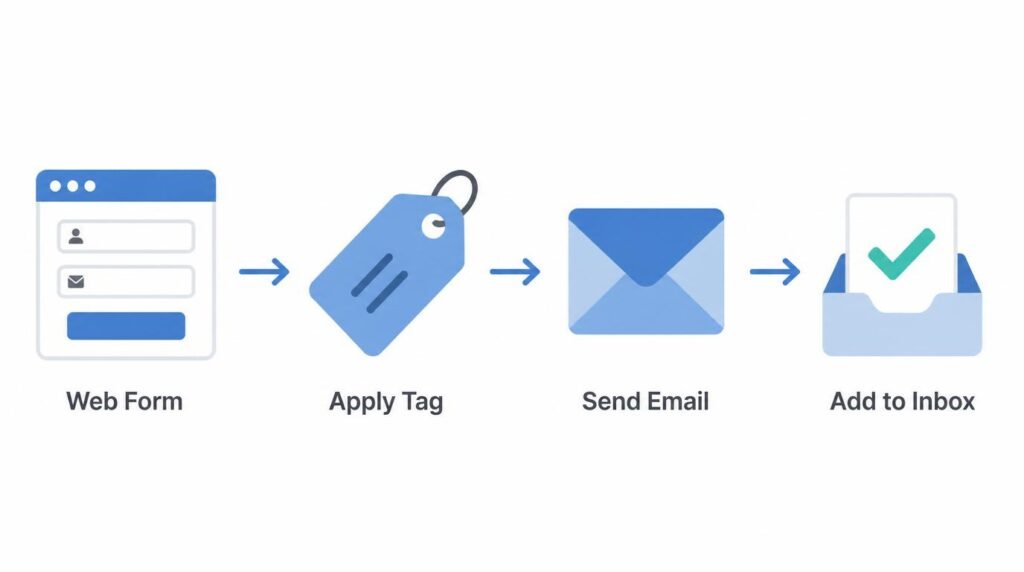
Here is the honest answer: most people build the lead magnet first, then rush the technical setup. TBH, the magnet itself is the easy part. The automation is where beginners consistently cut corners.
The three most common failure points are:
- The form is not connected to the automation. You built the form in one tool and the automation in another, but the integration was never properly configured or tested.
- The tag or list assignment is wrong. The form adds subscribers to a general list instead of triggering the specific automation built for this lead magnet.
- Double opt-in blocks delivery. The subscriber confirms their email but the automation only triggers on the initial form submission — so confirmed subscribers never receive the resource.
There is also a less obvious problem that almost no beginner article mentions. I will get to that in the advanced tactics section — and it is the one that costs the most subscribers without showing up in any obvious metric.
For now, understand this: the form-to-automation connection is the most fragile point in the entire sequence. That is where you start your diagnosis, every time. If you want a broader look at how funnels fit together, the email and funnel strategy guide at Affiliates Haven covers the architecture behind these systems in useful detail.
The Step-by-Step Troubleshooting Framework I Would Use
When a lead magnet delivery sequence breaks, the fastest way to find the problem is to walk the chain backwards — from the subscriber experience toward the form trigger. Here is the exact sequence I would follow.
Step 1: Test the Form Yourself With a Real Email Address
Use a personal email address you have not used with your list before. Fill out the form exactly as a subscriber would. Check every inbox folder — primary, promotions, spam, and any filtered categories — within five minutes of submitting. If nothing arrives, the problem is either the trigger or deliverability. If something arrives in spam, the problem is your sender reputation or email content.
Step 2: Check the Form-to-Automation Connection
Open your form tool and your email marketing platform side by side. Confirm that the form is mapped to the correct list, segment, or tag. Look at the integration settings, not just the visual confirmation that they are “connected.” Many integrations appear connected but pass incorrect field data or assign the wrong tag.
Step 3: Verify the Automation Trigger Conditions
Open the automation and look at the trigger rule. Is it set to fire when a subscriber is added to a specific list? When a specific tag is applied? When a form with a specific ID is submitted? Confirm the trigger exactly matches what your form actually does. A mismatch here is silent and common.
Step 4: Check Double Opt-In Settings
If you use double opt-in — which Mailchimp’s research shows produces cleaner lists but requires an extra confirmation step — verify that your automation trigger fires after confirmation, not after initial form submission. If the automation fires before confirmation and the subscriber never confirms, they are subscribed in a pending state and your delivery email sends to a dead-end address.
Step 5: Check the Delivery Email Content and Links
Open the delivery email and click every link. Verify the download link actually works and points to the correct file. Confirm the file is hosted on a reliable server — not someone’s Dropbox account that has gone over its bandwidth limit. Check that the email does not contain excessive links, spam trigger words, or large image files that could push it into spam folders.
Step 6: Review Your Sender Domain Authentication
SPF, DKIM, and DMARC records protect your sender reputation. According to DMARC.org, emails from domains without proper authentication are significantly more likely to land in spam or be rejected entirely. Check your domain authentication settings inside your email platform and confirm all three records are correctly published on your domain.

Common Mistakes That Waste Subscribers and Kill Trust
Sending the Download Link in the Confirmation Email Instead of a Dedicated Delivery Email
This is a structural mistake that collapses your sequence before it begins. When you put the download link in the double opt-in confirmation email, you remove any reason for the subscriber to check their inbox again. You also have no clean delivery event to track, no way to measure open rates on the delivery specifically, and no natural hook into the follow-up sequence. Send a separate, clean delivery email after confirmation. Always.
Writing a Delivery Email With No Next Step
Your delivery email should include the download link and one clear next action. Not three. Not a newsletter preview. One thing. This could be a reply prompt, a link to a relevant article, or a soft introduction to a product you recommend. A good CTA placement strategy applied here compounds your conversion rate across the entire sequence.
Assuming the First Email Is Enough
A subscriber who downloads your checklist and never hears from you again is not a subscriber. They are a one-time visitor who gave you their email address. Your list-building effort is wasted if you do not have a welcome sequence behind the delivery email. At minimum, three to five follow-up emails that introduce your brand, establish credibility, and move toward a relevant offer.
Advanced Tactics Most Articles Skip Entirely
Here is the issue nobody mentions: your lead magnet delivery email open rate is probably the highest open rate in your entire account. New subscribers are most engaged in the first 24 hours. Most marketers waste that engagement window by sending a generic “here is your download” email and nothing else for a week.
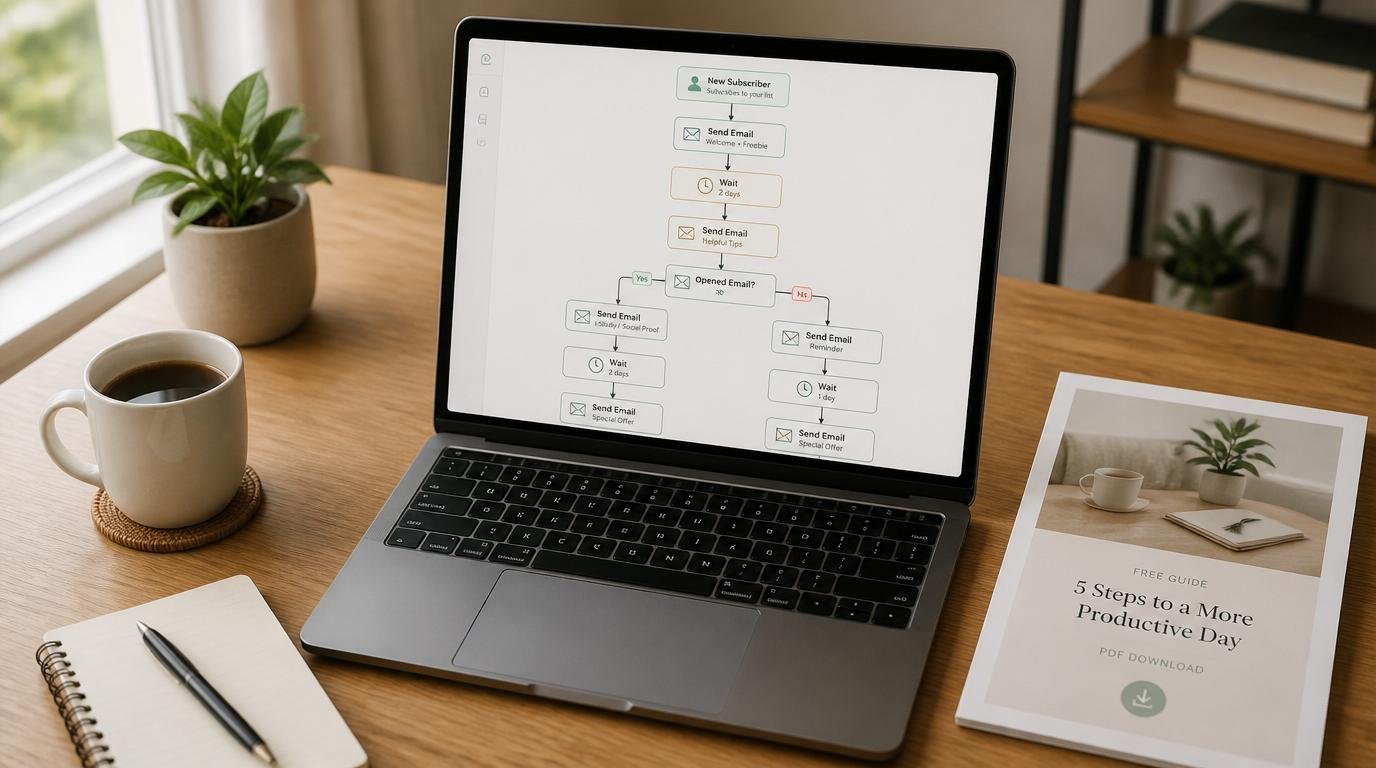
The smarter move is to use a behavior-based branch in your automation. If the subscriber opens the delivery email but does not click the download link, send a follow-up 24 hours later that re-sends the link with a different subject line. If they click the link, move them into a warmer sequence that assumes they consumed the content and are ready for a related offer.
This type of conditional logic is available in most mid-tier email platforms. ActiveCampaign’s automation documentation shows exactly how to build click-based conditional branching. It is not complicated once you see it mapped out, and it meaningfully increases the percentage of subscribers who take a second action.
Expert Commentary: This tutorial walks through the mechanics of connecting a form to an automation and building the delivery sequence in a visual email tool. Pay specific attention to the section on trigger conditions — that is where most beginner setups fail, and seeing it demonstrated in a live platform makes the logic click immediately.
Using Tag-Based Segmentation From Day One
Tag every subscriber based on which lead magnet they downloaded. This sounds like a minor administrative detail. It is not. When you have three different lead magnets six months from now, clean tag-based segmentation means you can send targeted follow-up offers to the exact audience most likely to respond. If you need ideas for expanding your lead magnet library, the lead magnet ideas resource at Affiliates Haven covers formats that work across different niches.
What I Would Avoid in Any Delivery Sequence
Why I Would Not Use a Generic “No Reply” Sender Address
Sending delivery emails from a no-reply address signals to both spam filters and your subscribers that you are not interested in a real conversation. It also kills your reply rate, which is one of the signals inbox providers use to determine whether your emails belong in the primary folder. Use a real name and a real reply-to address. The inbox placement difference is real, even if it is hard to measure directly.
Why I Would Not Host the Download on a Free File Sharing Service
Free Dropbox links expire or get bandwidth-capped. Google Drive links require the subscriber to be logged into Google. Both create friction that reduces the number of people who actually receive the resource. Host your lead magnet on your own domain or use a purpose-built delivery platform. The perceived professionalism difference is significant for a first-time subscriber.
I would also avoid loading your first follow-up email with affiliate offers. Ngl, the temptation is real when you have a product you want to promote — but hitting a new subscriber with a hard pitch in the first 48 hours burns the relationship before it starts. Warm them up with value first. The offer converts better when the subscriber trusts you.
Recommended Tools for Email Marketing Automation
The platform you choose shapes how easy or painful this entire process becomes. Here is what I look for when recommending email marketing tools to beginners building their first lead magnet sequence:
- Visual automation builder: You need to see the full flow on one screen. Text-based rule editors create confusion and make it harder to spot broken connections.
- Native form builder or clean integration: The fewer tools involved in the form-to-automation handoff, the fewer points of failure you introduce.
- Tag and segment support: Even if you are starting with one lead magnet, build on a platform that supports tagging from the beginning.
- Deliverability track record: Check independent deliverability reports. Email Tool Tester’s annual deliverability benchmarks are a reliable, non-promotional reference point.

Step-by-Step Action Plan to Fix Your Flow Today
Do you have thirty minutes right now? That is enough time to run this full audit and identify the break in your sequence.
- Submit your own form using a fresh email address and start a five-minute timer.
- Check every inbox folder — primary, promotions, spam, all of them — when the timer ends.
- Log into your email platform and open the subscriber profile for the test address. Confirm they were added to the correct list and tagged correctly.
- Open the automation and check the activity log. Confirm the automation triggered and the delivery email was sent.
- Click every link in the delivery email. Confirm the download works and loads within three seconds.
- Check your domain authentication records in your platform’s deliverability settings. Flag any missing SPF, DKIM, or DMARC records.
- Review your follow-up sequence. Confirm there are at least two emails after the delivery email and that each has a single, clear next action.
- Tag your test subscriber with the lead magnet identifier and confirm the tag appears in their profile.
That is the full audit. Run it every time you launch a new lead magnet or change your form setup. It takes less time than redesigning the magnet that will never get delivered.
FAQ: Lead Magnet Delivery Email Flow Questions
What is a lead magnet delivery email flow?
A lead magnet delivery email flow is an automated email sequence that triggers when someone submits a form, then delivers the promised resource — a PDF, checklist, or video — directly to their inbox. It typically includes a confirmation email, a delivery email with the download link, and one or more follow-up emails that move the subscriber toward a next action.
Why is my lead magnet email not being delivered?
The most common reasons are a broken form-to-automation trigger, a missing or incorrect tag/list assignment, a double opt-in gate blocking delivery, or the email landing in spam. Check your automation trigger first, then verify that the tag or list segment is correctly mapped, and test the full sequence yourself using a personal email address.
How many emails should a lead magnet delivery sequence have?
At minimum, three emails: a confirmation email sent immediately, a delivery email with the download link sent within minutes of opt-in, and a follow-up email 24 to 48 hours later that introduces your brand and offers a next step. Longer welcome sequences of five to seven emails work well for affiliate marketers who want to warm up subscribers before promoting offers.
Does double opt-in hurt lead magnet delivery rates?
Double opt-in reduces your raw list size by 20 to 30 percent on average, but it produces a cleaner, more engaged list. The problem for lead magnet delivery is that subscribers who expect an instant download may not check their inbox for the confirmation link. If you use double opt-in, make sure your thank-you page clearly instructs people to confirm their email before the resource is sent.
What email marketing tools work best for lead magnet delivery flows?
For beginners, ConvertKit and MailerLite are the most reliable for setting up a clean lead magnet delivery email flow without technical headaches. ActiveCampaign works well when you need more complex automation logic, conditional branching, or deep tagging. The right choice depends on your current subscriber count, budget, and how much automation complexity your funnel actually needs.
My Top Recommended Gear
These are the three categories of tools worth comparing if you are setting up or upgrading your lead magnet delivery setup.
1. ConvertKit (Now Kit) — Best Email Automation for Beginners
Best for: Beginner affiliate marketers who want a clean visual automation builder without a steep learning curve.
Why it is worth comparing: The tag-based subscriber model makes segmentation straightforward from day one. The visual automation canvas makes it easy to see exactly where a sequence breaks. A useful starting point for anyone building their first lead magnet flow.
Search ConvertKit email marketing guides on Amazon
2. ActiveCampaign — Best for Conditional Automation Logic
Best for: Affiliate marketers ready to build behavior-based branching sequences and more complex funnel automation.
Why it is worth comparing: Good fit for anyone who wants click-triggered branching, lead scoring, or CRM-level contact management built into their email platform. More powerful than most beginners need, but scalable as your list grows.
Search ActiveCampaign email automation guides on Amazon
3. Email Deliverability and Funnel Strategy Books
Best for: Beginners who want to understand the theory behind why sequences work before building them.
Why it is worth comparing: Understanding sender reputation, list hygiene, and sequence architecture gives you the judgment to troubleshoot problems independently rather than guessing. Useful if you want to build this skill properly rather than just copy a template.
Search email marketing automation strategy books on Amazon
Your Next Step
If you got this far, you have everything you need to diagnose a broken lead magnet delivery email flow and fix it systematically. Run the audit in the action plan section above before you do anything else. Most problems resolve in one or two steps.
When the delivery sequence is working, the next focus is building a welcome sequence that earns trust and moves subscribers toward your affiliate offers. The email funnel strategy guide at Affiliates Haven is the logical next read — it covers the structure of a subscriber welcome sequence that converts without feeling pushy.
Your list is only as valuable as the trust you build in the first seven days. Get the delivery right. Then build the relationship. The conversions follow from there. 🙂
Disclaimer: This post contains affiliate links. As an Amazon Associate, I may earn a commission from qualifying purchases at no additional cost to you. I only recommend products I have personally tested, carefully researched, or believe offer practical value based on clear use cases.